Windows app

Falling notes piano software
for your Windows PC

Open any MIDI file and Pianovera turns it into falling notes on an 88-key keyboard, with 3D hands that show the fingering and a sampled grand piano behind every key. It installs from the Microsoft Store on Windows 10 and 11, and the free version has no time limit.

7 seconds of Clair de Lune exported by the Studio of Pianovera 3.1 for Windows (silent loop).
651pieces included, 30 of them free
88keys on screen, or as few as 13
4Kfalling notes videos, up to 60 fps
3ways to play: screen, MIDI keyboard, microphone

How the falling notes work on your PC

Every note becomes a bar that falls toward its key. The longer the bar, the longer you hold the note, and its colour tells you which hand plays it. When it reaches the glowing line, the key lights up and the sampled grand piano of the Windows app, the Akai-Steinway III by Denis, plays it as softly or as loudly as written. Above the keys, 3D hands play along, so you see the fingering instead of guessing it.

The music comes from wherever you like. Pianovera ships with 651 pieces, most of them in a beginner, intermediate and original version, and it opens your own .mid and .midi files. Need a file to start with? Our free piano MIDI files come with their sheet music.

Then you pick how to play: Free play to watch and listen, Wait to stop until you press the right key, Learn in sections, or Scored scrolling to be scored at tempo. In the free version, Wait works on the free pieces, in the lessons and in the daily challenge, and Scored scrolling once a day; Premium opens the rest. On a PC you can play the on-screen keyboard with the mouse, plug in a USB MIDI keyboard (Pianovera only reads it and never sends anything back), or sit at your acoustic piano: the microphone recognises the notes you play, and the sound stays on your computer.
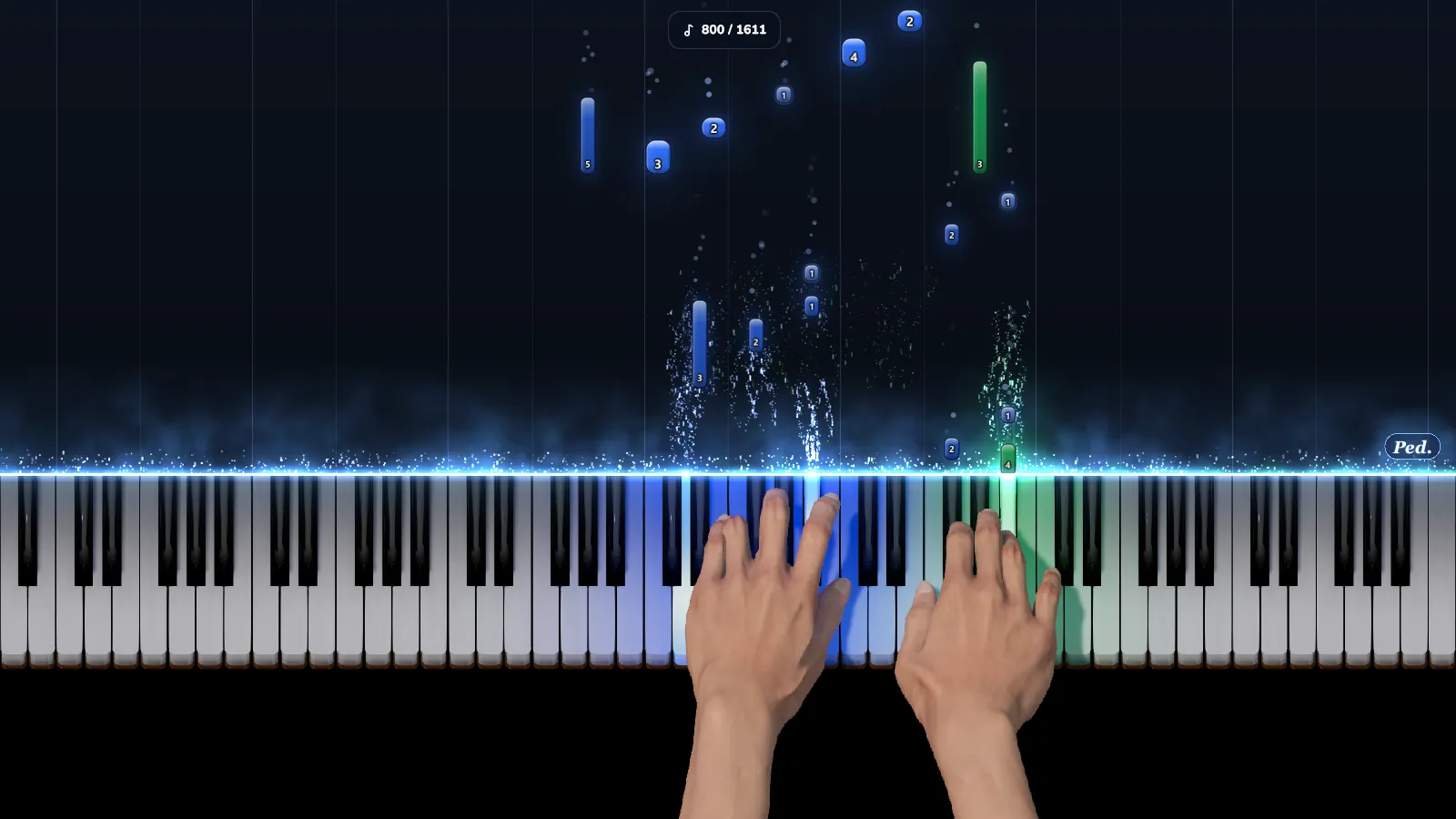
Pianovera 3.1 for Windows playing Debussy’s Clair de Lune: blue and green falling notes with the finger number on each note, lit keys and 3D hands.
Debussy’s Clair de Lune, original version: blue notes for the left hand, green for the right, and the finger to use written on each note.

Falling notes or sheet music? You can keep both

Falling notes get you playing fast: there are no clefs to decode, the screen shows the key and the moment. That is also their limit. On their own they don’t teach you to read music, and they say little about phrasing, which is why many piano teachers are wary of them. We think they have a point.

So Pianovera keeps the score in view. The Sheet music view shows the whole page, and the “Line + notes” and “Scrolling + notes” views put a line of score, fingering included, right above the falling notes, with a cursor that follows the music. When you want to learn to read for real, the step-by-step piano lessons start at middle C, and Note reading trains you over 8 levels.
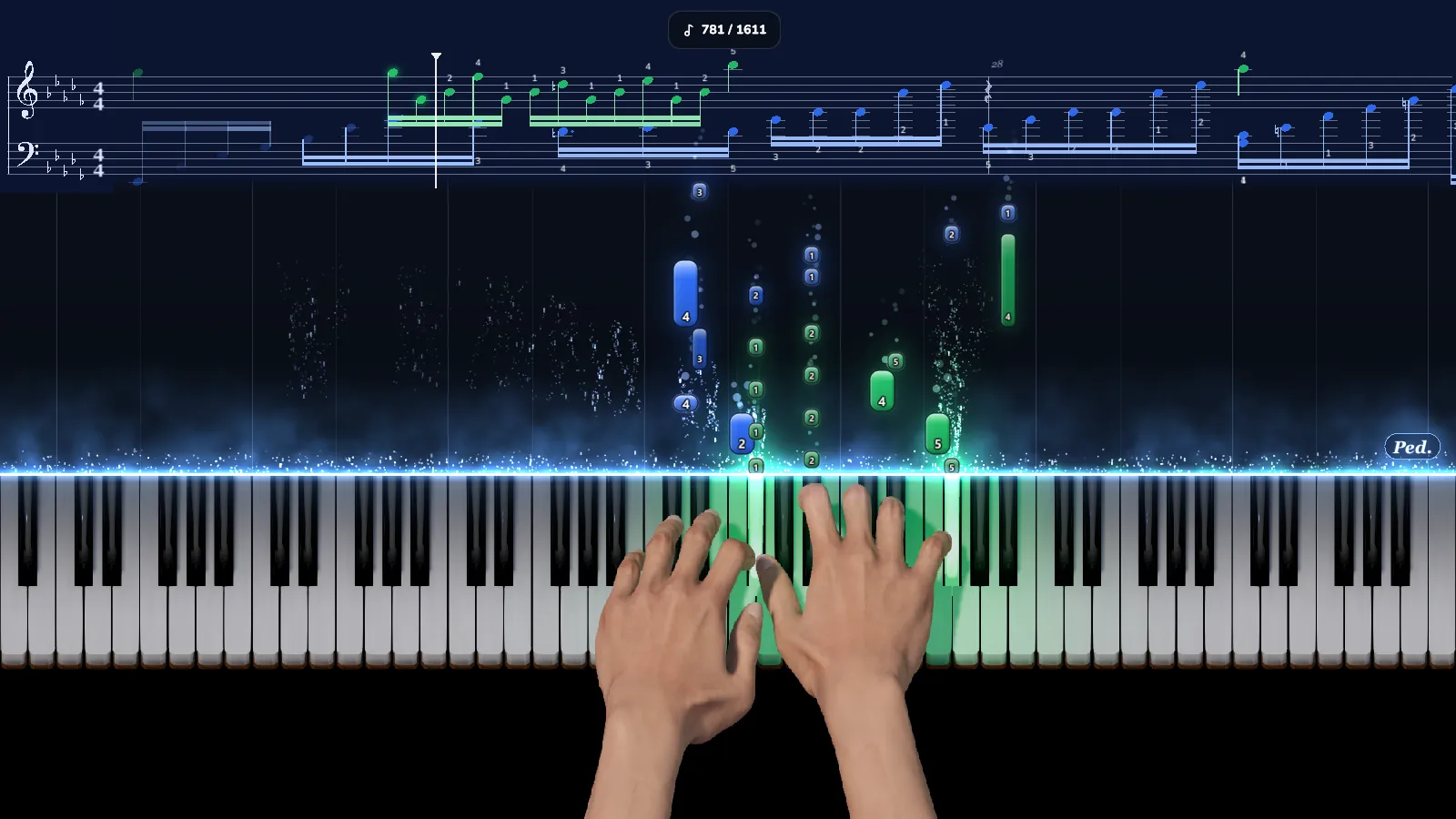
The “Scrolling + notes” view in Pianovera 3.1 for Windows: a line of sheet music with fingering above the falling notes and the 3D hands.
The “Scrolling + notes” view: the score line, fingering included, above the falling notes.

Export falling notes videos for YouTube and Shorts

Many people who look up falling notes want to make the videos, not just watch them. The Studio in the Windows app exports an MP4 straight from the piece, widescreen or vertical for Shorts, with your background, your logo and a title card, in 720p, 1080p or 4K at 30 or 60 fps. The piano sound is in the file, and the particles, halos and lighting you chose for playback are the ones you get in the video. No editing software needed.

The free version exports 2 videos a week, 30 seconds each, in 720p, without the hands and with the Pianovera watermark, from the free pieces and your own MIDI files. Premium removes those limits, goes up to 4K and adds the 3D hands to your videos.

Not on Windows? Pianovera also runs on Mac (macOS 12 or later), on Android through Google Play, and in your browser with nothing to install.

Frequently asked questions

Is Pianovera free on Windows?

Yes, with no time limit and no ads: 10 pieces in full and 20 more in their simplest version, the rest of the catalogue as 15-second previews, 10 minutes of 3D hands (then 15 seconds at the start of each piece) and 3 MIDI files of your own a week, 30 seconds each. Premium opens everything for €6.99 a month, €29.99 a year or €59.99 once, and the monthly and yearly plans start with 3 free days.

Which versions of Windows does it run on?

64-bit Windows 10 (version 1809 or later) and Windows 11. From the Microsoft Store, Pianovera is checked by Microsoft and updates itself. Without the Store, the installer needs no admin rights, and a portable ZIP is also available in the download section.

Can I open my own MIDI files?

Yes. Open a .mid or .midi file and it plays straight away as falling notes. The free version opens 3 of your own files a week, 30 seconds each; Premium has no limit and opens every mode on them.

Do I need a MIDI keyboard?

No. The on-screen keyboard plays with the mouse, with 13 to 88 keys. A USB MIDI keyboard gives you the real touch, and Wait then follows what you play. On an acoustic piano, the microphone recognises your notes; the sound stays on your PC.

Does it work offline?

Yes for playing: playback, sound, lessons and video export all run on your PC. You need a connection to activate a purchase and to check for updates, and a monthly or yearly Premium subscription stays valid for 7 days without one.