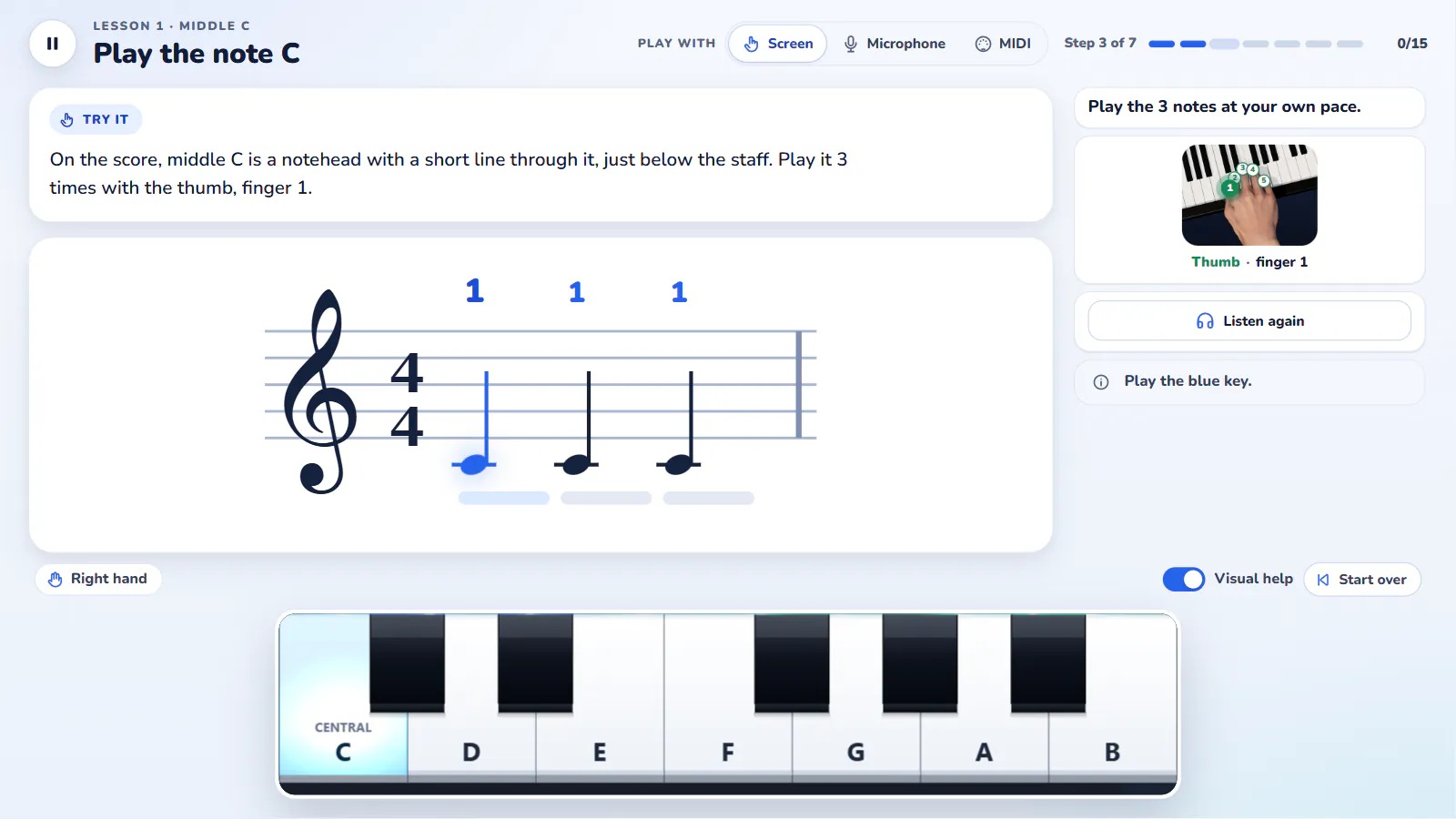
Pianovera’s piano lessons live inside the app, on Windows and Android: the staff at the top, a small keyboard at the bottom, and the note to play lit up. Play on screen, with a MIDI keyboard or on your real piano through the microphone. The 56 lessons take you from your very first note to complete pieces. No music theory required first: the course teaches it along the way.
How a lesson works
Every lesson comes in three parts. First a short tip that sets up the idea of the day: where middle C is, what the thumb is for, what a half note changes. Then practice: the staff shows the phrase to play, the expected note lights up on the keyboard with its finger number, and the app waits until you play it. A gauge fills under the note while you hold it, which fixes the classic beginner habit of letting go too early. Finally a 3-question quiz, in big cards, checks what stuck.
The on-screen keyboard adapts to the lesson. Seven white keys for the first notes, an octave once the hand position widens, and both hands side by side from the Left Hand course on, without ever squeezing the keys. Wrong notes are counted but never block you: a missed step comes back a little slower, with more leeway, your accuracy shows up, and your level climbs with experience points. A “3, 2, 1” count-in starts every passage in time. Your streak and the number of finished lessons sit on the home screen, like any decent practice log.
A lesson takes about 5 minutes. That’s on purpose. Beginner piano lessons that demand an hour of focus rarely survive the third week. Here one lesson a day is enough, and nothing stops you from chaining three when you feel like it.
The course: 9 units, 56 lessons
The curriculum follows the order a real piano teacher would use. Right hand first, then left hand, then rhythm and reading. Only then does the hand position widen, chords arrive, and the great classical themes take over. All 9 units are live in the app, in all 4 languages. The last one, Accompaniment, teaches the left-hand patterns that make a song; it only assumes the chords from unit E.
AFirst steps
The right hand, middle C and your first five notes. “Au clair de la lune”, then “Ode to Joy”.
Lessons 1 to 7 · live
BLeft hand
The bass clef, then both hands: one after the other, and together.
Lessons 8 to 13 · live
CRhythm and reading
Eighth notes, dotted notes, rests, a waltz: reading the score without help.
Lessons 14 to 19 · live
DA wider position
Thumb under, the C major scale, the first black keys.
Lessons 20 to 25 · live
EChords I
C, G, F, A minor: the progression you hear everywhere, then inversions.
Lessons 26 to 31 · live
FClassical I
Minuet in G, Für Elise, Pachelbel’s Canon, Gymnopédie, Swan Lake.
Lessons 32 to 37 · live
GStyle and expression
Dynamics, legato, pedal, arpeggios, syncopation, seventh chords and blues.
Lessons 38 to 43 · live
HRepertoire
Greensleeves, Amazing Grace, Prelude BWV 846, the Moonlight Sonata opening, then your first free piece.
Lessons 44 to 50 · live
JAccompaniment
The 4 magic chords and the left-hand patterns that make a song.
Lessons 51 to 56 · live
Every piece in the course is public domain, which means you play it in full and find it again later in the library, with the falling notes heading for the keys. The 579 pieces included in the app (30 free) and our free MIDI files pick up naturally where course H ends.
Piano lessons for adults, and for kids
An adult beginner wants to understand what they’re doing. So the tips explain the why: why the thumb sits on C, why this bar has 4 beats, why the left hand reads a different clef. Lessons are short, replay without limit, and nobody is looking over your shoulder. Piano lessons for adults mostly need consistency, and a few minutes a day are easier to find than an hour on Saturday.
A kid just wants to play. The card quiz, the points, the level going up and the challenge league turn practice into a game without watering down the content. On a tablet or a phone the touch keyboard is wide enough for small fingers, and the app asks for no account and no email. A parent can follow progress on the Profile screen, or sit next to them and do the same lesson on the real piano with a MIDI cable.
Screen, MIDI keyboard or microphone. Choose at the top of the lesson how you play, and your choice is kept: on screen (with the mouse on Windows, with a finger on Android), with a MIDI keyboard, or on your real piano through the microphone. A MIDI keyboard is read-only: the app never sends anything back to your instrument. On Android, it plugs in over USB with an OTG adapter. The microphone sound is analysed on the device, never recorded or sent.
What’s included, and what it costs
The first 10 lessons are free, on Windows and on Android, with no time limit and no ads. After that, one more lesson opens with each token, and your first completed challenge of the day earns one: that makes one more lesson a day for anyone who practises. Premium, monthly, yearly or lifetime, opens all 56 lessons with no limit.
New lessons arrive through app updates. Your progress carries over from one version to the next.