Gymnopédie No. 1
Erik Satie
Burgmüller's Arabesque as a free MIDI: 26 seconds to watch fall, one piano file to download, the sheet music PDF thrown in.

Play it with the 3D hands in Pianovera
Green notes: right hand, blue notes: left hand. Preview played right in your browser with the app's real piano (lightweight version). Inside Pianovera: full multi-layer sound, fingering display and Wait mode.
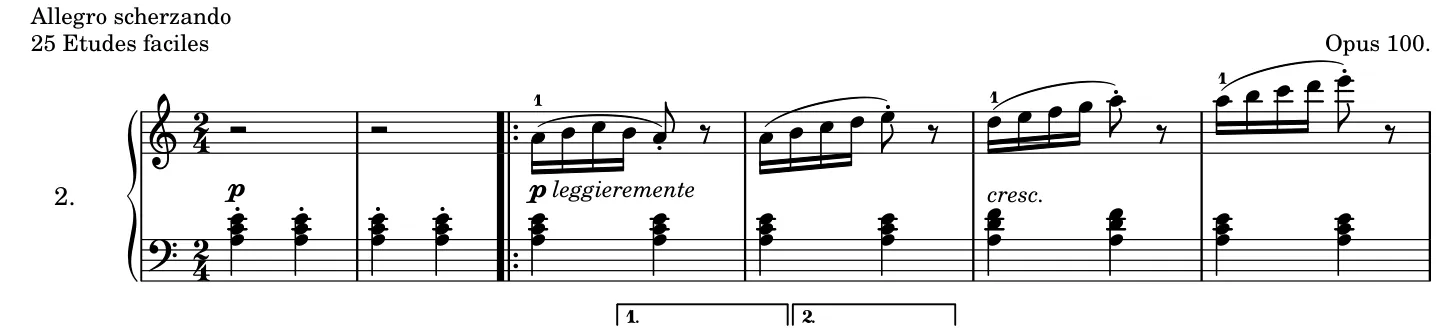

Tap a bar to jump there · engraved by the Mutopia Project.View the whole score (PDF) →
Twenty-six seconds of MIDI, and very likely the first taste of speed for millions of pianists. The Arabesque is the second of Burgmüller's 25 easy studies written for the parlors of 19th-century Paris, and it has outlived every method book since: five fingers climbing in sixteenth notes, a mischievous air, an ending that snaps shut.
Its teaching mission is crystal clear: five-note groups in a fixed hand position, right hand first, then left. No awkward jumps, no tangled chords, just pure finger agility inside the hand. It's short, gratifying, memorized in two days. The speed, that part grows over weeks, and watching it grow is the whole pleasure.
Right hand, in letter names (C4 = middle C): A4 B4 C5 B4 A4 A4 B4 C5 D5 E5 D5 E5 F5 G5 A5 A5 B5 C6 D6 E6 E5 E5 F5 D5… The rest scrolls in the preview above, with the fingering, and the sheet music PDF has the whole piece.
Here are the Arabesque Op. 100 No. 2 virtual piano notes, in computer keyboard letters: the first 8 bars of the melody. One key per note, read left to right; dark keys are the sharps, and a thin line marks each bar. The melody sounds an octave lower than written, so it fits on the keyboard.
N M Q M N N M Q W E
W E R T Y Y U I O P
E E R W W
T W E Q E
A perfect fit for Pianovera's A·B loop: the entire piece fits inside one. Play it in Wait mode on day one, Scroll at 70% on day two, and watch your cruising speed rise on the progress curve.
Open Arabesque Op. 100 No. 2 in Pianovera: the notes fall toward an 88-key virtual piano keyboard, each hand gets its color, and Wait mode is there if you're starting out. On a PC, it's falling notes piano software for Windows, with video export up to 4K.
Free, with no time limit and no ads: 30 pieces (10 in full, 20 in a simplified version), the first 10 lessons and 10 minutes of 3D hands (then 15 seconds per piece). Premium opens all 651 pieces.
Two files are waiting for you: the Arabesque Op. 100 No. 2 piano MIDI file (3 KB, opens in Pianovera or any MIDI player) and the Arabesque Op. 100 No. 2 piano sheet music PDF (65 KB, printable). Both come from the same engraving: what you read on the score is exactly what you hear in the preview.
The work itself is in the public domain, and this MIDI engraving was placed in the public domain by its typesetter on the Mutopia Project. Use it freely, videos included.
We rate it beginner: 283 notes over 0:26, spanning A2 to A6. The first thing to work on: five-note sixteenth groups, fingers close to the keys.
Right on this page: the "View the sheet music" button opens the PDF (65 KB), engraved by the Mutopia Project from the same source as the MIDI file, Public domain license. View it, print it, keep it.
Yes. Friedrich Burgmüller died more than 70 years ago, so the work (1852) is public domain. This MIDI engraving is public domain too: download it and use it freely, videos included.
Erik Satie
Johann Sebastian Bach
Robert Schumann
The Windows version won’t run on a phone.
Get the Android appFree on Google Play, with no time limit.
Play in your browser